Notes & editing
Create and edit notes with titles, rich content, pinned items, and favourites.
Create notes, build checklists, save reminders, and keep everyday ideas beautifully organized with a note-taking experience designed for work, life, and everything in between.
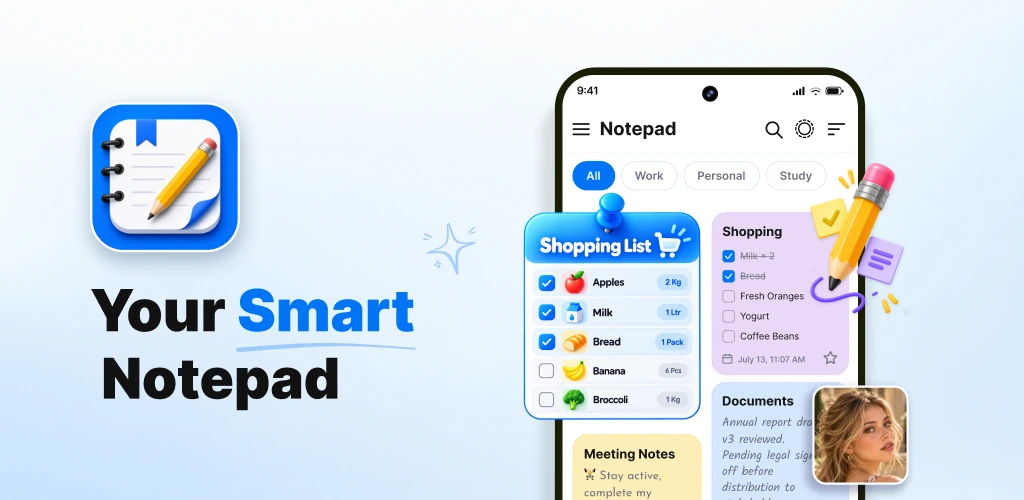
Capture thoughts as they happen, then keep them easy to find.
Turn errands, study tasks, and shopping needs into clear checklists.
Switch visual style and keep note-taking comfortable day or night.
The website presents the app around the real things people use every day: quick notes, to-do lists, reminders, categories, attachments, and a calmer way to stay organized.
Create and edit notes with titles, rich content, pinned items, and favourites.
Build shopping lists, daily tasks, and to-do lists with clear checkbox progress.
Choose grid or list layouts and switch between light and dark themes.
Support for reminders, calendar planning, images, drawings, and voice notes.
This design uses a premium productivity style inspired by paper, widgets, and modern editorial interfaces, while keeping the story focused on the app’s practical note-taking tools.
Write down thoughts, reminders, work items, and useful information with a clean editor that stays fast and easy to use.
Build to-do lists, shopping lists, and everyday checklists, then mark tasks complete as you go.
Choose colors and backgrounds, switch between light and dark themes, and select grid or list layouts.
Organize with categories, tags, archive, trash, smart search, and practical sorting options.
Save photos, drawings, and voice recordings alongside notes to keep more context in one place.
Set reminders, use calendar planning tools, and keep important notes close with home-screen widgets.
From meeting points to shopping reminders, capture information quickly and keep it available when it matters.
Track progress clearly with simple checkboxes and a layout that keeps priorities easy to follow.
Use categories, tags, favourites, archive, trash, and sorting tools to keep the notebook tidy as it grows.
This section turns your full app description into polished, customer-facing website content while preserving the feature set you provided: notes, checklists, reminders, personalization, smart organization, attachments, and widgets.
Notepad, Notes, Easy Notebook is positioned as a practical notebook app for everyday organization. It is designed for quick note-taking, easy editing, and keeping personal, work, and day-to-day information in one place.
The experience goes beyond simple text notes. You can create to-do lists, shopping lists, grocery lists, and reminders, then manage them from a single workspace that supports both notes and checklist-style organization.
The app emphasizes customization through note colors, backgrounds, list or grid views, and both light and dark themes. That flexibility helps the notebook feel more comfortable and easier to scan throughout the day.
Categories, tags, favourites, archive, trash, and smart search help keep information accessible. Sorting notes by newest, oldest, or title also supports faster browsing and retrieval.
The app also supports image, drawing, and voice attachments, making it useful for meeting notes, ideas, shopping lists, daily planning, saved information, and quick reminders that need more context than text alone.
Whether you are studying, organizing work, preparing errands, or simply trying to remember the next important thing, the app is presented as a straightforward productivity tool made to help everyday routines feel easier to manage.
The gallery uses the supplied screenshots as images rather than links, keeping the website self-contained and Firebase-friendly. Click or tap any image to view it fullscreen.
From quick idea capture to task tracking and reminder-based planning, the app is positioned as an everyday companion for staying on top of information.
Keep daily reminders, personal notes, shopping lists, and saved information in one place.
Collect meeting notes, action items, and study plans with easy editing and checklist support.
Store ideas with colors, voice recordings, photos, and drawings whenever inspiration arrives.
Important website details are linked here in a simple, dependable format for users who want more context before installing.
The app is presented for quick notes, personal notes, work notes, checklists, shopping lists, reminders, and saved information.
Yes. The provided description specifically includes checklist creation, adding and removing items, rearranging entries, and marking tasks complete.
Yes. The app description highlights note colors, note backgrounds, list or grid view options, and light or dark themes.
Yes. The feature list you provided includes photos, drawings, voice recordings, and home-screen widgets for quick access.
Enjoy a cleaner daily workflow for notes, lists, reminders, attachments, and organization tools — all wrapped in a simple notebook experience built for everyday productivity.
Get it on Google Play